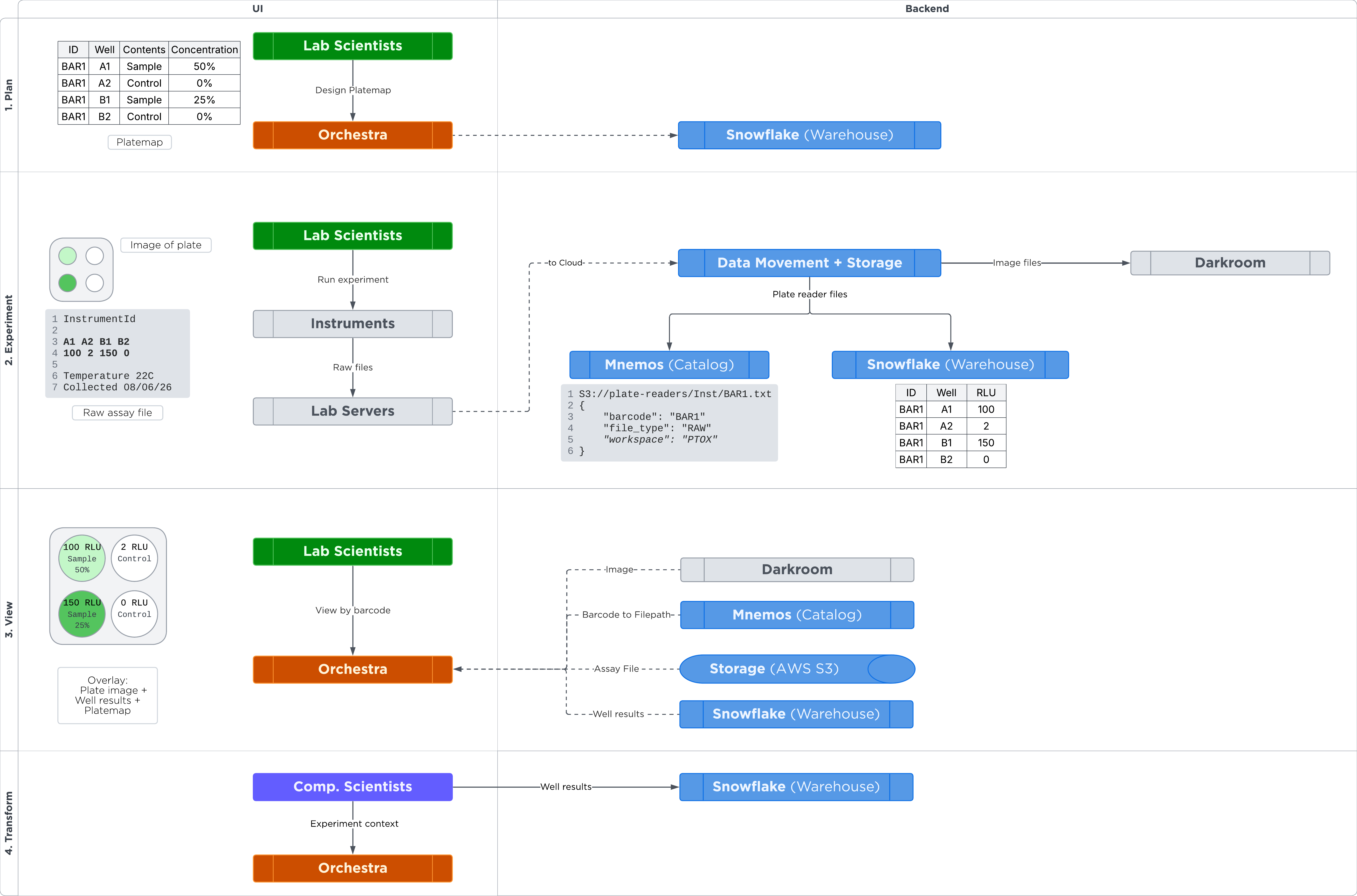
pTOX data flow
Contact: pTOX collaboration Slack channel — #xred-orchestra-data-layer
Data Layer view
flowchart TB
    onprem[("On-prem servers")]
    orchestra[("Orchestra")]
    subgraph DISH["DISH domain"]
        bifrost["Bifrost"]
        storage["Storage Service"]
        mnemos["Mnemos Catalog"]
        snowflake["DISH Snowflake"]
    end
    s3[("AWS S3 buckets")]

    onprem -->|data sync| bifrost
    bifrost -->|writes files| s3
    storage -->|manages buckets| s3
    s3 -->|describes files| mnemos
    s3 -->|parsed into| snowflake
    orchestra -->|feeds| snowflake

    click bifrost "#svc-bifrost" "Bifrost details"
    click storage "#svc-storage-service" "Storage Service details"
    click mnemos "#svc-mnemos-catalog" "Mnemos Catalog details"
    click snowflake "#svc-dish-snowflake" "DISH Snowflake details"
    click s3 "#s3-buckets" "AWS S3 buckets"
    click orchestra "#src-orchestra" "Orchestra details"
    click onprem "#src-onprem" "On-prem servers details"

    classDef svc fill:#ffffff,stroke:#6366f1,stroke-width:1px,color:#1e1b4b;
    classDef src fill:#f6f7f9,stroke:#e6e8ec,color:#94a3b8;
    class bifrost,storage,mnemos,snowflake svc;
    class onprem,orchestra,s3 src;
    style DISH fill:#e7e9fd,stroke:#c7d2fe,stroke-dasharray:5 5;
Bifrost
Moves raw assay/instrument files from on-prem plate readers and imagers into the pTOX S3 bucket. Runs as a job system with no service UI of its own.
-
UI: Bifrost Chat Assistant — the pTOX tasks were created under the
bifrostteam, so they are only visible to that team. -
Docs: Bifrost docs
-
Slack: #help-bifrost
pTOX runs five Bifrost tasks (all in the bifrost team), each syncing one
instrument’s files into a subdirectory of the bucket:
| Task | Instrument | S3 subdir |
|---|---|---|
|
IXM |
|
|
Leica Thunder |
|
|
Yokogawa CQ1 |
|
|
PerkinElmer EnSight |
|
|
WPI EVOM Auto |
|
Storage Service
Creates and manages the AWS S3 buckets that hold the raw pTOX files Bifrost delivers and that Snowflake parses from — see AWS S3 buckets for the pTOX bucket names.
-
Access: anyone can sign in to view or create buckets; only a bucket’s owners can manage it.
-
UI: Storage Service UI — view a bucket and its configuration.
-
Docs: Storage Service docs
-
Slack: #help-data-ecosystem-storage
AWS S3 buckets
Raw pTOX instrument files (and manually uploaded assay files) live in S3. Bifrost writes lab data here, Mnemos catalogs it, and DISH Snowflake parses it.
-
Production (lab data):
ptox-labdata-usw2-prd-d18e -
TST (test data):
ptox-testdata-usw2-prd-3e18 -
Account: both live in
prd-storcat; TST reads the testdata bucket cross-account. -
Manage: via the Storage Service UI (above) — only a bucket’s owners can change its configuration.
With AWS access you can browse them directly:
aws s3 ls s3://ptox-labdata-usw2-prd-d18e/plate-readers/    # PRD lab data
aws s3 ls s3://ptox-testdata-usw2-prd-3e18/plate-readers/   # TST / test data
Mnemos Catalog
Catalogs metadata for the pTOX files held in S3 so you can search and explore the cataloged assets.
-
Access: readable by any Roche user.
-
UI: Mnemos web app — search by the pTOX bucket
ptox-labdata-usw2-prd-d18e. -
Lineage (production Beta): Beta UI — detailed lineage views.
-
Docs: Mnemos docs
-
Slack: #help-mnemos
Finding pTOX assets by barcode:
-
Images — S3 key prefix
imagers/. Add a JSON Metadata filter onpath: JSON pathmetadata.Barcode, operator Equals (=), then enter the barcode value. Returns multiple images (e.g. one per well). -
Plates — S3 key prefix
plate-readers/. Add the same JSON Metadata filter, using JSON pathbarcode.
|
When searching Mnemos, filter by created after 2026-08-01 to avoid a query timeout. |
DISH Snowflake
Parses the raw files into structured tables and joins them with Orchestra platemaps.
pTOX data lives in DISH_BRONZE_<env>.PTOX (raw landing) and DISH_SILVER_<env>.PTOX
(cleansed models); the object most consumers read is the silver join view
well_results_with_platemap — one row per (file, well) with the instrument result,
plate-level ASM metadata, and the platemap treatment and concentration.
Getting access: ask the DISH team for a Snowflake account with pTOX reader access. Two environments exist — TST and PRD (production); PRD holds the fuller set of pTOX ingestion data.
UI: sign in with SSO at
app.snowflake.com
(xred_us_west_2_main serves both TST and PRD). Then:
-
Browse data — Catalog > Database Explorer.
-
Query — Projects > Workspaces (create a file to query), or use the Snowflake AI assistant.
-
API access — create a Programmatic Access Token (PAT): account menu (bottom-left circle) > Settings > User - Authentication.
Query the pTOX join view in a Workspace:
SELECT BARCODE, WELL, VALUE, UNIT
FROM DISH_SILVER_PRD.PTOX.WELL_RESULTS_WITH_PLATEMAP
WHERE BARCODE = '<plate-barcode>'
ORDER BY VALUE DESC
LIMIT 10;
Or query via the SQL API with your PAT (production). Set your token once:
export PAT='<your-programmatic-access-token>'Set the query you want to run:
STATEMENT="SELECT DISTINCT BARCODE FROM DISH_SILVER_PRD.PTOX.WELL_RESULTS_WITH_PLATEMAP WHERE BARCODE LIKE '%MAP01%' ORDER BY BARCODE"Send it — jq -n --arg builds the payload so any quotes, backslashes, or newlines
in $STATEMENT are encoded safely. Re-run this block after changing $STATEMENT:
jq -n --arg stmt "$STATEMENT" \
  '{statement:$stmt,role:"PTOX_READER_ROLE_PRD",warehouse:"DISH_PTOX_PRD_WH",database:"DISH_SILVER_PRD",schema:"PTOX",timeout:60}' \
| curl -s -X POST "https://roche-xred_us_west_2_main.snowflakecomputing.com/api/v2/statements" \
  -H "Authorization: Bearer $PAT" \
  -H "X-Snowflake-Authorization-Token-Type: PROGRAMMATIC_ACCESS_TOKEN" \
  -H "Content-Type: application/json" -H "Accept: application/json" \
  --data-binary @- \
  | jq -r '(.resultSetMetaData.rowType|map(.name)),(.data[])|@tsv' | column -t -s $'\t'
Other statements to try — set one, then re-run the send block above:
# Well count per barcode
STATEMENT="SELECT BARCODE, COUNT(*) AS wells FROM DISH_SILVER_PRD.PTOX.WELL_RESULTS_WITH_PLATEMAP WHERE BARCODE IS NOT NULL GROUP BY BARCODE ORDER BY BARCODE"

# Value range per measurement type (min/max/avg)
STATEMENT="SELECT MEASUREMENT_TYPE, MIN(VALUE) AS min_value, MAX(VALUE) AS max_value, AVG(VALUE) AS avg_value FROM DISH_SILVER_PRD.PTOX.WELL_RESULTS_WITH_PLATEMAP GROUP BY MEASUREMENT_TYPE ORDER BY MEASUREMENT_TYPE"

# Well results for one barcode
STATEMENT="SELECT BARCODE, WELL, VALUE, UNIT FROM DISH_SILVER_PRD.PTOX.WELL_RESULTS_WITH_PLATEMAP WHERE BARCODE = '<plate-barcode>' ORDER BY VALUE DESC LIMIT 10"
For TST, swap the role, warehouse, and databases to PTOX_READER_ROLE_TST,
DISH_PTOX_TST_WH, and DISH_*_TST.
External systems
These feed the pTOX flow but are not DISH services.
Orchestra
Enables manual upload of raw assay files and pushes platemap snapshots into DISH
(landing in DISH_BRONZE_<env>.PTOX.ORCHESTRA_PLATEMAP_LANDING, modelled as the
silver orchestra_platemap view). Orchestra also reads the joined pTOX well results
back out for downstream users.
-
UI (UAT): uat.orchestra.roche.com
-
Slack: #xred-orchestra-support
On-prem servers
The plate readers / instrument sources whose files Bifrost syncs into S3.
-
Instrument list: pTOX instruments sheet (limited access)